Mastering Reasoning State Engineering – Part 2
Part 1 of the Reasoning State Challenge explained the AI memory or reasoning layer that fades. Part 2 provides the architecture and approach for recovering it.

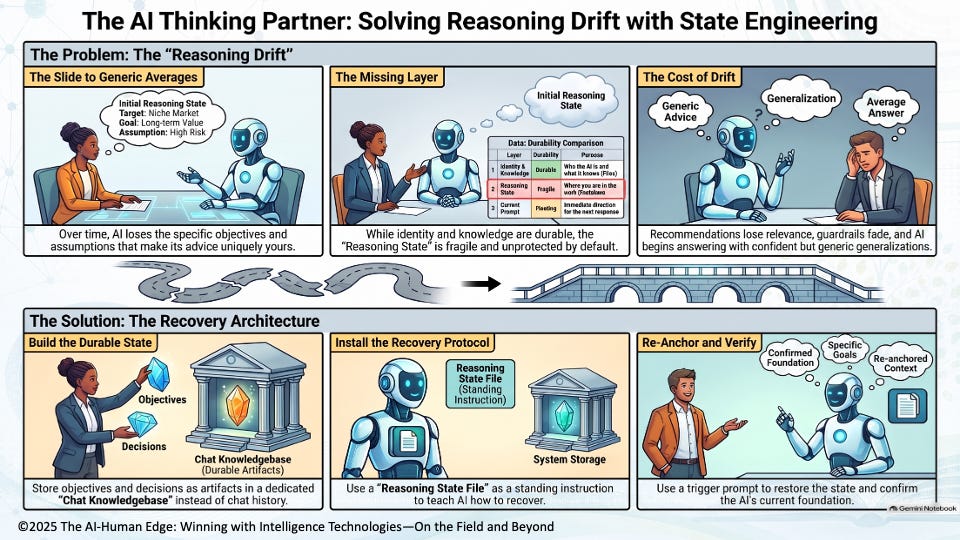
Part 1 exposed a dangerous weakness in long-running AI collaborations – their reasoning fades. As the collaboration grows, the AI tool gradually forgets the objectives, priorities, assumptions, decisions, and definitions established at the beginning of the conversation. What began as reasoning from your specific and unique situation slowly becomes reasoning from the generic average, putting the relevance, responsibility, and accuracy of every subsequent recommendation at risk.
That leaves us with the critical question Part 1 raised: if the AI tool’s memory fades as the conversation progresses, how do we recover it? The answer lies at the heart of Reasoning State Engineering. It separates the AI collaboration into three components: durable state, standing recovery instructions, and a simple trigger that reconnects them. Once those three components are visible, activating the missing layer becomes surprisingly straightforward.
The Reasoning Recovery Architecture
Reasoning State Engineering blends four components, each doing exactly one specific job.
Establish standing behavior. Your project instructions / Activation Prompt define YODA’s identity, reasoning disciplines, and quality guardrails. This is who the AI is and how it thinks — set once, always on.
Build the durable initiative state. As you work through the YODA steps, each step produces initiative-specific content: intent and context; objectives and desired outcomes with associated KPI weights; trusted market and industry knowledge; internal domain expertise; world-leading expert knowledge and experience; and stakeholder desired outcomes, key decisions, and associated KPIs. These artifacts live in the Chat Knowledgebase, not the Project Knowledgebase. Together, they form the durable foundation of the initiative’s Reasoning State—the accumulated record of where the collaboration currently stands. The user does not need to create and maintain a separate Reasoning State Snapshot; the Reasoning State File and Re-Anchor Prompt direct the AI to recover, reapply, and confirm the state from these accumulated artifacts.
Install the recovery protocol. Upload the YODA Reasoning State File once, at the project level. Here is the part most people miss: the Reasoning State File is not another knowledge document. It is the control mechanism — the standing protocol that tells the AI how to recover those step artifacts and reapply them. The state lives in the artifacts; the File is the instruction for reconstructing it.
Trigger and verify recovery. Use the Re-Anchor Prompt whenever the AI begins drifting—or whenever you damn well want to confirm that it is still reasoning from the right foundation. The prompt triggers the recovery protocol; the confirm-back verifies that it worked. Trigger, check, and continue.
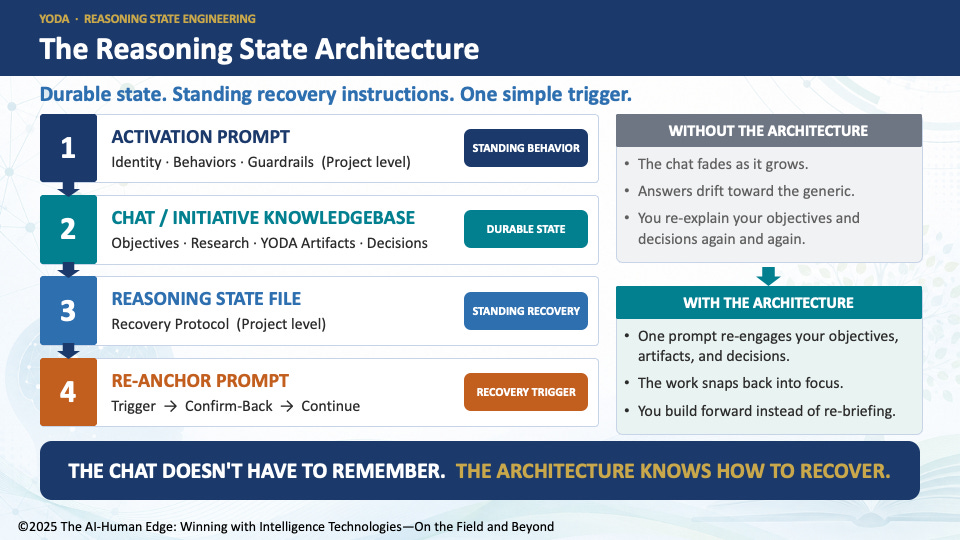
That’s the breakthrough: a durable state you build, a standing protocol that knows how to recover it, and a one-line trigger that reconnects them on demand.
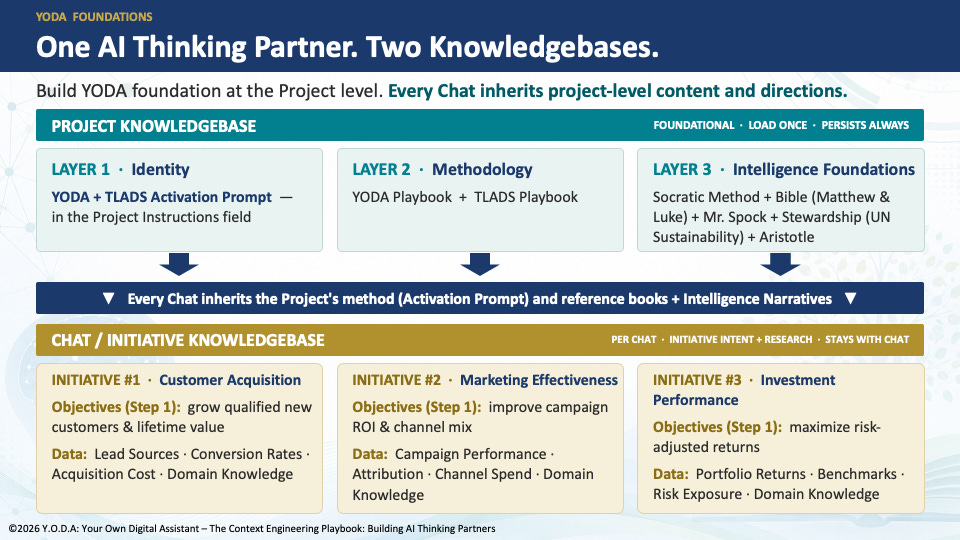
📘 CALLOUT: TWO KNOWLEDGEBASES. TWO DIFFERENT PURPOSES.
Project (Organizational) Knowledgebase — Establishes how the AI behaves and thinks. It contains the reusable Activation Prompt, critical-thinking methodologies, Intelligence Disciplines, operating instructions, the Reasoning State File (the standing recovery protocol), and quality guardrails that apply across every initiative.
Chat (Initiative) Knowledgebase — Grounds the AI in one specific business initiative. It contains that initiative’s objectives, KPI weights, stakeholders, trusted research, internal knowledge, assumptions, expert guidance, and decisions. Together, these artifacts comprise the initiative’s Reasoning State, which the Reasoning State File and re-anchor prompt help the AI recover, reapply, and confirm.
For example, a bank might create a YODA project with shared behaviors, critical-thinking disciplines, governance standards, and operating instructions that guide all work. Within it, separate chats could focus on customer acquisition, marketing effectiveness, and investment performance, each maintaining its own knowledge and Reasoning State.
Keeping them separate makes the organization’s AI-empowered knowledgebase easier to maintain, improve, reuse, and scale.
Activate Reasoning State Engineering
The architecture may sound sophisticated, but activating it requires only a disciplined five-step routine.
Install the recovery protocol once.
Place the YODA Reasoning State File in the Project Knowledgebase, where it can support every initiative chat governed by the project.Build the initiative’s durable state.
As you work through YODA, add each step’s confirmed artifacts to that initiative’s Chat Knowledgebase. Together, these objectives, weights, trusted sources, assumptions, expert guidance, and decisions comprise the initiative’s evolving Reasoning State.Trigger recovery with one prompt:
“Re-read the YODA Reasoning State File and re-apply it to this initiative. Then confirm the objectives, weights, assumptions, and key decisions you’re working from.”Verify the confirmation.
Review what the AI hands back. Correct anything missing, stale, or inconsistent before continuing. The confirm-back makes recovery observable: if the AI cannot accurately restate the initiative’s foundation, it has not fully recovered the Reasoning State.Re-anchor when needed.
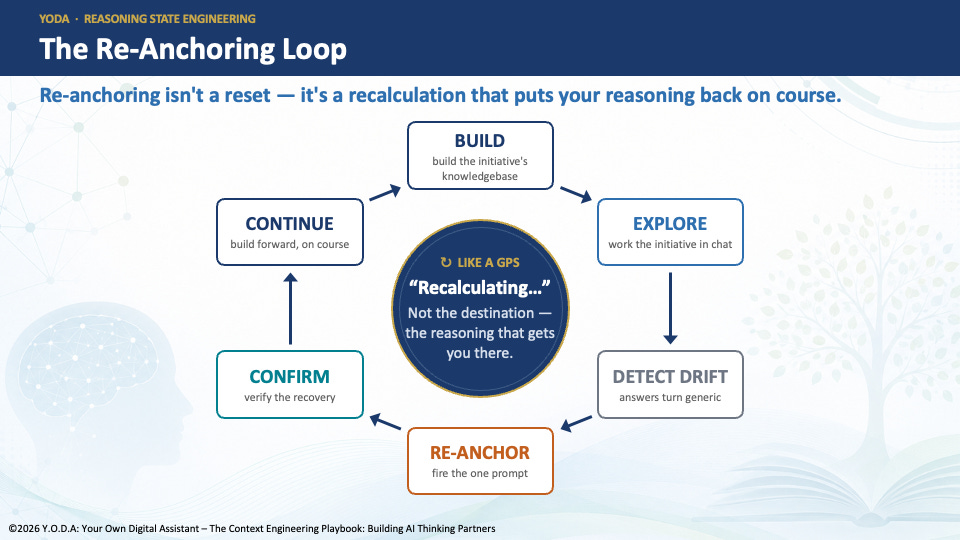
Use the prompt after adding important knowledge, at major YODA milestones, when returning to the work after a pause, or whenever the answers begin drifting toward the generic. Re-anchoring frequently does no harm.
That is the complete routine: install once, build the initiative state, trigger recovery, confirm the foundation, and continue.
How the Architecture Works
The directions above explain what you do. Here is why they work: the architecture—not the conversation—preserves and recovers the reasoning.
The state is separate from the conversation. Your objectives, weights, assumptions, decisions, and definitions live in the accumulated artifacts within the Chat Knowledgebase, not only in the fading conversation. The conversation remains temporary—and that is fine. Conversations are for exploration. The durable initiative record resides in the artifacts, while the Reasoning State File provides the standard recovery method that the collaboration can invoke whenever needed.
The File recovers; it never rewrites. The Re-Anchor Prompt does not change the Reasoning State File or the underlying initiative artifacts. It tells the AI to re-read the File, apply its recovery protocol, and reconstruct the current Reasoning State from the accumulated artifacts—pulling the AI’s attention back to the foundation you established.
The confirm-back makes recovery observable. This is the safeguard. If the AI cannot accurately state the objectives, weights, assumptions, and key decisions it is working from, the Reasoning State has not actually been recovered—and you have caught the problem before building on a fake recovery.
Why it should feel familiar. This is how serious software systems preserve long-running work. Operating systems do not trust temporary memory to hold everything forever. They preserve important state in durable storage and recover it when needed. Reasoning State Engineering applies the same principle to human–AI collaboration.
The conversation explores. The artifacts preserve. The Reasoning State File recovers.
The Takeaway
Part 1 exposed the problem: as an AI collaboration grows, the reasoning that made it uniquely yours can quietly slip out of view. The AI keeps answering—but it gradually stops reasoning from your objectives, priorities, assumptions, and decisions.
Part 2 provides the solution: stop asking the conversation to remember what the architecture should preserve.
Reasoning State Engineering separates the collaboration into durable initiative artifacts—captured in the Chat Knowledgebase through the YODA process—a standing recovery protocol, and a simple trigger that reconnects them. When the AI begins drifting—or whenever you damn well want to check—you re-anchor, confirm, and continue.
The objective is to create a focused, sustainable collaboration that can always recover the reasoning behind the work.
The conversation explores.
The artifacts preserve.
The Reasoning State File recovers.
That is the missing layer. And it changes the promise of an AI Thinking Partner from:
“I hope it remembers where we are.”
to:
“When the reasoning drifts, I know how to bring it back.”
Professor, long time no see. It’s good to read your work again.
I especially liked your idea that “the conversation explores, while the artifacts preserve.” It gave me something new to think about.
Recently, I’ve also been using AI to explore some ideas about civilization, often starting from one observation, then mapping outward and discovering unexpected connections.
Your article made me wonder: when AI reasoning begins to drift, how do we know whether it is actually drifting—or whether it is beginning to discover something new worth keeping?
Thanks for sharing. It’s good to reconnect.